
CST 8109 Network Programming Assignment | Algonquin College
Looking for Plagiarism free Answers for your US, UK, Singapore college/ university Assignments.
| University | Algonquin College |
| Subject | CST 8109 Network Programming |
CST 8109 Assignment
Lab #1: Deploy SOHO Network with NAT using Packet Tracer Software. [20%]
This Lab relates to the following Course Learning Requirements:
CLR 3: Properly apply subnet masks and addresses (IPv4 and IPv6) to devices in a network
CLR4: Build a simple Ethernet, IPv4 and IPv6 networks using routers and switches
Objective of this Lab:
The objective of this lab to is evaluate your understanding of DHCP, DNS, IP addressing, Subnetting, Routing and NATing. It will also have you apply the skills learned in this course in a hands-on experience for network simulation using packet tracer.
Pre-Lab Instructions:
- To prepare you for this lab, read and understand modules 4, 5, 7, 11 and 12 content.
- It is important that you understand how DNS and DHCP works, IP address classes including public and private IP address.
- Understand different types of NAT and their configuration command.
- Build topology and practice configuration on packet tracer. You will perform/configure this lab using Packet Tracer. If you require a refresher on how to use and save content in Packet Tracer, please revisit the content from modules 11 and 12.
Lab Scenario:
Q1. You are given a network 192.168.10.0/27 for your office. Your company should have one DHCP server and one DNS server with static IP address. You have 25 employees at your office and everyone is using a PC. DHCP server will provide IP address dynamically to these PCs. Your DNS should resolve www.myDNS.com for your employees. There is a Server 10.10.10.10/8 in another network. When your employees are accessing this server, they should use Public IP addresses so that your private network remains hidden from the outside world. For this purpose, your company already bought an IP pool range 200.10.0.1 – 200.10.0.99. Now implement NAT on the required router.
(For designing topology you can show only 5 PCs in the office network)
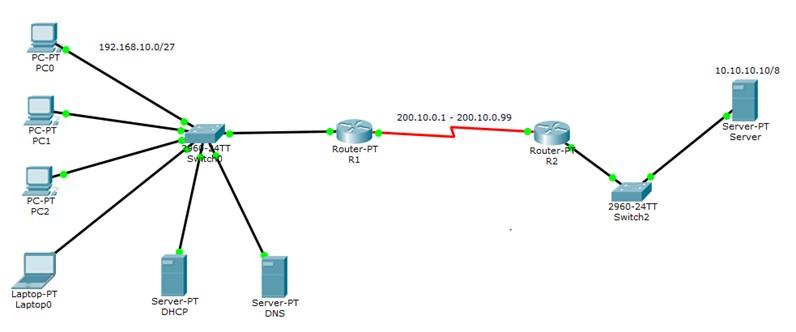
a. Once you are done with configuration, save the configuration by typing “wr” command on each router. Save the packet tracer file.
b. Your packet tracer file should include all the required configuration on PCs, R1, R2, DHCP server, DNS server and Server on other network.
[To check all the configuration in router, you can use the following command “show running-configuration”]
Rubric and Marking
| Task / Configuration | Marks |
|---|---|
| Static IP for DHCP | 1 |
| Static IP for DNS | 1 |
| Static IP for server on other network | 1 |
| Dynamic IP for hosts from DHCP | 2 |
DNS entry for www.myDNS.com |
2 |
| IP route command on R1 and R2 for network reachability | 3 |
| Dynamic NAT configuration on R1 | 10 |
| Total Marks | 20 |
Flexible Rates Compatible With Everyone’s Budget
Hire a Professional Essay & Assignment Writer for completing your Academic Assessments
Looking for Plagiarism free Answers for your US, UK, Singapore college/ university Assignments.